MODOU is now available. Turn an image into a bead pattern, then adjust colors and details in the editor. You can also start with an empty board.
Image conversion and pattern editing
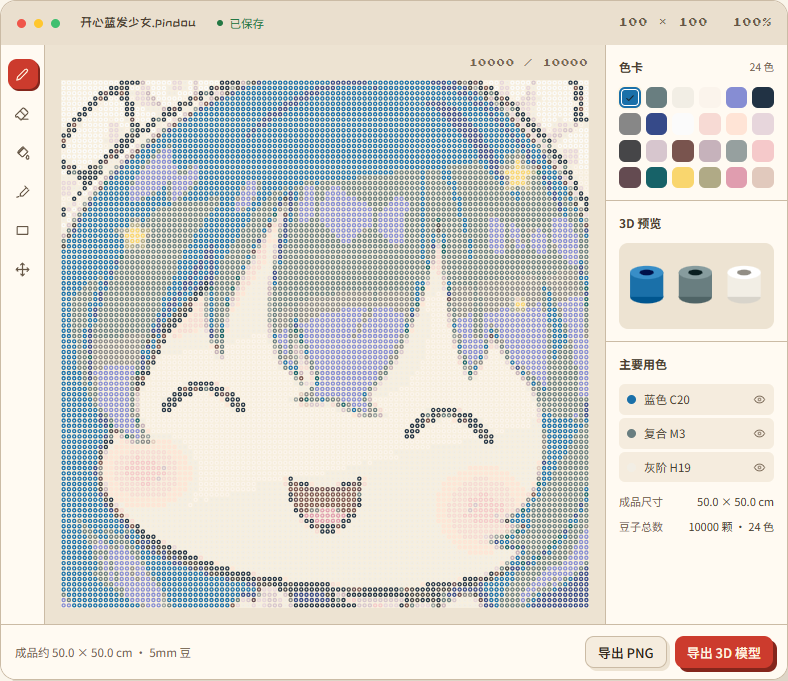
Import an image and adjust the pattern size, palette and background processing. Then use the pencil, eraser, fill and selection tools to edit the pattern.
The palette and bead counts update with the board. Switch to the 3D preview to check the result. Export a PNG pattern, an STL or OBJ model, or a .pindou project file to keep editing later.
Local drafts and cloud saves
You can convert images, edit patterns, preview, save local drafts and download your work without signing in. Image conversion and export run on your device. Signing in does not automatically upload local drafts.
To save across devices or share a project, sign in and choose to save it to the cloud or publish it to the gallery.
Give it a try
- Open MODOU and try the interactive homepage example, or turn one of your images into a pattern.
- Refine it in the editor, change some colors, and check the bead counts and 3D preview.
- Download your pattern or save the project to keep working on it later.
Use a desktop browser for the editor, which is designed for mouse input. The app interface is currently in Chinese.